|
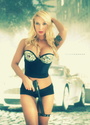
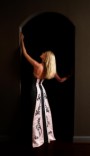
PLEASE READ RULES BEFORE YOU ENTER . New Hours of Operation: 12pm MM Time - 12pm MM Time. MON-WED-FRI! Voting does not start until: 6pm MM Time. EACH CONTEST DAY! The winner for yesterday was JIOPIX. Congratulations!  PLEASE READ RULES BEFORE YOU ENTER . IMPORTANT: RULES 1. One entry per person per day. 2. One vote per person per day. 3. No bumping your entry. 4. No vote stacking or asking for other MM members to vote for you. 5. Voting starts at 6 pm (after 11 am)the day of contest ,it closes at 11 am the following day when it ends voting ends .(MM time.) However entries start as soon as post is up. 6. No voting for an image you participated in creating. 7. To vote, quote the entry you wish to vote for and type "Vote". 8. Mature 18 + images are allowed but must contain a link and not the actual image posted. 9. Photo Artwork must be digital art. 10. Unlike some contests you may post a story to go along with your work. 11. If you enter, you are expected to vote. It's common courtesy! 12. No re-entering a picture that has already won. 13. You must post with your entry what medium (software used) and how you processed the artwork(example : Photo, new background, Painted etc or Oil painted, photoshop etc...) If you do not post how you processed it (steps taken) and the medium, you will be disqualified. 14. Must include actual PHOTO of person that YOU participated in created (as photographer or digital artist ). No 3d characters as main focus. THE EXPLANATION OF HOW THE IMAGE IS PROCESSED IS A VITAL PART OF THIS CONTEST. ACCEPTED ENTRIES: 1. Photomanipulation (ie. Changed as if adding object, extracting, new background, elements etc.) Describe in detail. 2. Painting Digitally(oil or anything else.) 3 . A photo that has the same elements but is then rendered into a different photo, for example adding a third person, a castle and changing colors and hand painting it. 4. Drawing in photoshop, painter etc...Describe in detail. NOT ACCEPTED ENTRIES: 1. Photos right out of camera. 2. Photos only changed in color, saturation or corrections. 3. Retouches (skin changes, smoothing and blurring, removel of blemishes and changing the overall color of background, clothes etc....) 4. Simple copy and paste onto background. 5. Images created using copyrighted imagery from another individual, company, etc. No game screen shots. Please follow these. If anyone submits images that are violating the rules we will disqualify it from the contest. Thanks very much and continue creating. Vote and by all means, have fun! Themes: Today: Artisits Choice CONTEST RUNS FROM 12PM MM TIME TO 12PM MM TIME MON, WED AND FRI.! VOTING STARTS AT 6pm MM TIME. Voter's Clock here http://www.griffinbikini.com/mm/mmtime.html , provided by Ellen Griffin Photos. Digital Art of The Day Contest is managed by FJR Photography  Mar 12 13 05:48 pm Link Shot model at the different positions and blended them into one , adjusted tones and colors and added light and fog to the image .  Mar 12 13 09:35 pm Link  Original image shot against white. Using photoshop, I cutout model and placed over new background. Saturated colors and added some highlights to model to better match. Added slight vignette. Mar 13 13 05:32 am Link  model shot in woods standing in between the trees , added faces to the trees. remove ground and replaced with murky water then added tree reflections and fog. Added in large snake from other shoot,leather skirt to cover over her shorts.Several color layers in the water.Burned in a moon changed it's color added few bats and changed night sky colors. Arm tattoo was layer on over and the leather head wings, added a color mask to turn her hair redder. Mar 13 13 05:38 am Link A bit confused if I am within the deadline to enter, but if so:  Adobe Photoshop -- Bed turned from single to double by using various selections and cloning together. Bench extended again with selections and cloning. Photograph extended 25% extra to the left by cloning window, cloning and painting floor, and table, and painting shadows. Dog added using a mask and shadow painted on bed. Model added with mask, dodged and burned and painted to reflect light coming in from window behind her. Black vulture wings added with lower parts of wings painted lighter in colour to give the illusion of light shining through wings. Angel shadow added to front of bed, bench, and floor. Light effect added to windows to give the appearance of light entering the room. Mar 13 13 04:19 pm Link up to the top Mar 14 13 04:01 am Link Alan Pedroso wrote: VOTE!!!! Mar 14 13 06:18 am Link Alan Pedroso wrote: vote Mar 14 13 07:56 am Link Alan Pedroso wrote: V O T E Mar 14 13 07:59 am Link Incubus Imagery wrote: VOTE Mar 14 13 08:21 am Link JIOPIX wrote: Vote Mar 14 13 08:32 am Link Sorry I did not get things posted for Friday. Been a bad week topped off by losing Mom yesterday afternoon. I'll be here Sun evening to post this winner and put up a new contest for Monday. Mar 16 13 04:52 am Link FJR Photography wrote: Sorry to hear about your loss. Mar 16 13 02:25 pm Link My deepest sympathies Fred , sorry about losing your mom , may she be where you would want her to be . Mar 16 13 04:20 pm Link Sorry for your loss. Mar 16 13 05:30 pm Link Sorry to hear Fred. Let me know if you need help with any contests. Mar 16 13 06:40 pm Link |